If you’ve ever started a data project from scratch, you know the truth: finding a good dataset is often the hardest part. While Kaggle and GitHub are great, most of the time, real-world projects don’t come with tidy CSV files ready to go. You have to get your hands dirty and fetch the data yourself.
That’s where web scraping and APIs come into play. In this post, I want to talk about both approaches, using two projects I’ve worked on: a Job Market Dashboard, where I used Selenium to scrape job postings from the web, and my current economic research, which pulls macroeconomic data using the FRED API and the World Bank API.
But before I dive into how I collected the data, let me walk you through the thought process behind it.
Before You Gather Data: What You Should Consider
Before you even open a Jupyter notebook or start importing requests, it’s worth slowing down and asking a few questions. Jumping straight into scraping or calling APIs without a plan usually leads to messy code, unusable data, or wasted time.
Here’s what I’ve learned to check early in the process:
- What’s the exact question you’re trying to answer?
If you can’t phrase it clearly, you probably don’t know what kind of data you need yet. Be specific. Instead of “I want to explore job trends”, ask “What skills are most in-demand for data scientists in Illinois in 2024?” - Does the data already exist somewhere?
Always check for APIs, public datasets, or open data portals. A quick search might save you hours of scraping. - How often does the data change?
If it updates frequently (like job listings), you might want to build something that refreshes automatically. If it’s static (like a 2020 census), a one-time download is fine. - Is the data behind a login, JavaScript, or a paywall?
If it is, scraping gets trickier and slower. This could make or break your decision between APIs and scraping. - Do you have permission to access it?
Always check a website’s robots.txt or API terms of service. Ethically and legally, this matters. I’ve seen people get IP-banned or blocked because they hammered a server without checking. - What format do you need?
Do you want time series, images, text, or tables? It’ll affect how you store, clean, and structure the pipeline later.
Once I’ve got these questions sorted out, then you have the green light to move on to choosing between scraping or APIs.
Job Market Dashboard: Web Scraping with Selenium
When my team and I started the Job Market Dashboard project, our goal was to analyze hiring trends across different states in the US. We needed fresh data from job boards like Indeed, ZipRecruiter, and LinkedIn. The problem? Most of them don’t give you an API.
So we turned to Selenium.
Why Selenium?
Selenium automates your browser. If a site relies heavily on JavaScript, it can load the full page, click buttons, scroll down, and extract whatever is on screen. That’s perfect for modern job boards.
We tried static scraping at first, using BeautifulSoup, but it couldn’t deal with dynamic content. The job cards just weren’t in the HTML when the page first loaded.
A Simple Example
Here’s a simplified version of how we got job titles and company names from Indeed:
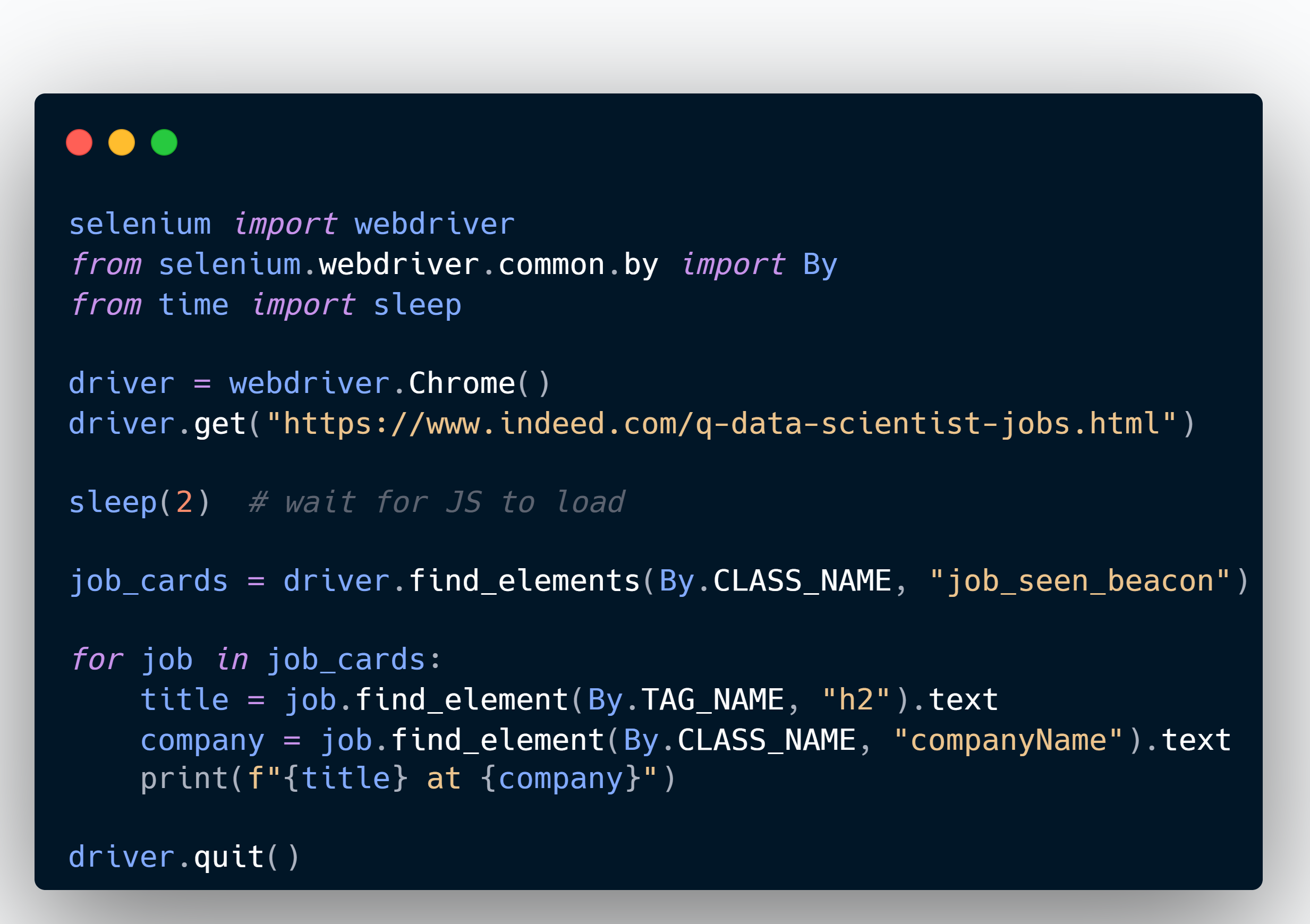
We saved this output into timestamped CSVs to keep each run clean and reproducible. And each site required a slightly different strategy depending on how they structured job listings.
What Went Right and What Didn’t
The good:
- We had total control over the data and could target any field on the page
- No dependency on someone else’s API limitations
The bad:
- One layout change could break the scraper overnight
- Sites used anti-bot tools that blocked scraping if we weren’t careful
- It was slow and required heavy error handling
Research Project: Using the FRED and World Bank APIs
Fast forward to my current research, which involves analyzing economic trends to study things like recession indicators, unemployment rates, GDP, and interest rates. This time, I didn’t need to scrape anything because both FRED and the World Bank have APIs that give you exactly what you need.
Working with the FRED API
FRED (Federal Reserve Economic Data) has a huge repository of US and international economic time series. You register for an API key, pick a series ID, and hit the endpoint.
Here’s an example where I pulled Canada’s real GDP:

World Bank API Example
World Bank’s API is RESTful and a bit trickier to work with at first, but it’s very powerful. Here’s how I got unemployment data for Canada:

This makes it easy to integrate new indicators on demand. If I want GDP per capita, inflation, or labor force participation, it’s just a matter of changing the series code.
What I Liked About APIs
The good:
- Fast, structured data in JSON or XML
- Consistent formats with documentation
- Easier to integrate with automated pipelines
The catch:
- Some series are discontinued or incomplete
- Rate limits and API key setup can be annoying at first
- You’re stuck with whatever the API exposes
So, When Should You Use What?
If the data is available through an API, use the API. It’s faster, more reliable, and easier to maintain.
But if the data lives on the web with no structured access, scraping is your fallback. Just be aware of the maintenance cost and ethical or legal implications. Always check the site’s robots.txt and don’t overload servers with hundreds of requests in a loop.
Here’s a quick summary:
Use Web Scraping when
- There’s no API, or the API is too limited
- You need something very specific that’s only available visually
- You’re okay with maintenance and a little fragility
Use APIs when
- You want reliable, structured data
- The platform supports it and you don’t need data outside what the API exposes
- You’re building something that needs to scale or refresh automatically
Final Thoughts
Both scraping and APIs taught me a lot about working with real-world data. Scraping was a test of patience and debugging, while APIs showed me how powerful it is to plug directly into massive datasets.
In the end, getting your data is step zero. The method you choose depends on what’s available and how much control you need. Just don’t install everything globally and forget version control. Trust me.
Have you had to fight with messy data sources? Let me know your go-to tools and stories in the comments or reach out. I’d love to hear about your scraping/sourcing strategies!
 Learning with Data
Leave a comment